

Go to the marketplace and install the MojaTax VFD.
Just agree to the terms of service and authorize the extension to process the required data
After clicking on “Install”, you will be redirected to a screen where the following variables will be visible:
Please enter your Client ID, and Client Password in the respective fields.
After installation, a “Fiscalize Invoice” button will appear in the Invoices module.
You can find this button inside each invoice view.
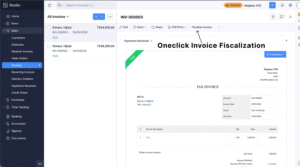
After installation, go to any of the supported modules: Invoices.
You will see a “Fiscalize Invoice” button inside each invoice.
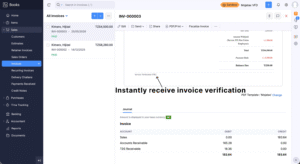
Fiscalize Invoices and Receive TRA Verification Instantly
Open any record in the Invoice module.
Click on the “Fiscalize Invoice” button.
A request will be sent to Motajax, then to TRA.
A success or failure response will appear with a reason.
Upon success, the invoice item will be updated with a TRA verification link.
Email: info@mojatax.com
Website: www.mojatax.com
 English
 Swahili